


By the AI Boom Team | Published 19 October 2026 | A practical guide for UK small businesses
Most small businesses do not have an AI problem. They have an admin problem. Replying to the same customer questions, chasing schedules, typing data from one place into another: it quietly eats hours every week. AI can hand a lot of that time back, but only if you bring it in with a plan. This guide gives you one: four steps, twelve weeks, and no big software bills.
Want to tick things off as you go? Grab our one-page-per-step checklist: The AI Boom Small Business AI Rollout Checklist (PDF).


Step 1: Audit your workflows and find the bottlenecks
Before you buy anything, write down what your team actually does all day. Not the job titles, the tasks. Then circle the ones that are repetitive, frequent and manual.


- Look for time sinks. The usual suspects are replying to generic customer questions, drafting email sequences and data entry.
- Define success early. Pick one measurable target, such as cutting weekly scheduling time by 50% or cutting client onboarding from three days to one.
- Write down today’s number. You cannot prove an improvement without a baseline.
Why this matters: businesses that skip the audit tend to buy tools first and hunt for problems later. One clear metric keeps you honest, stops “AI for AI’s sake” and gives you something concrete to show your team, your boss or your accountant.
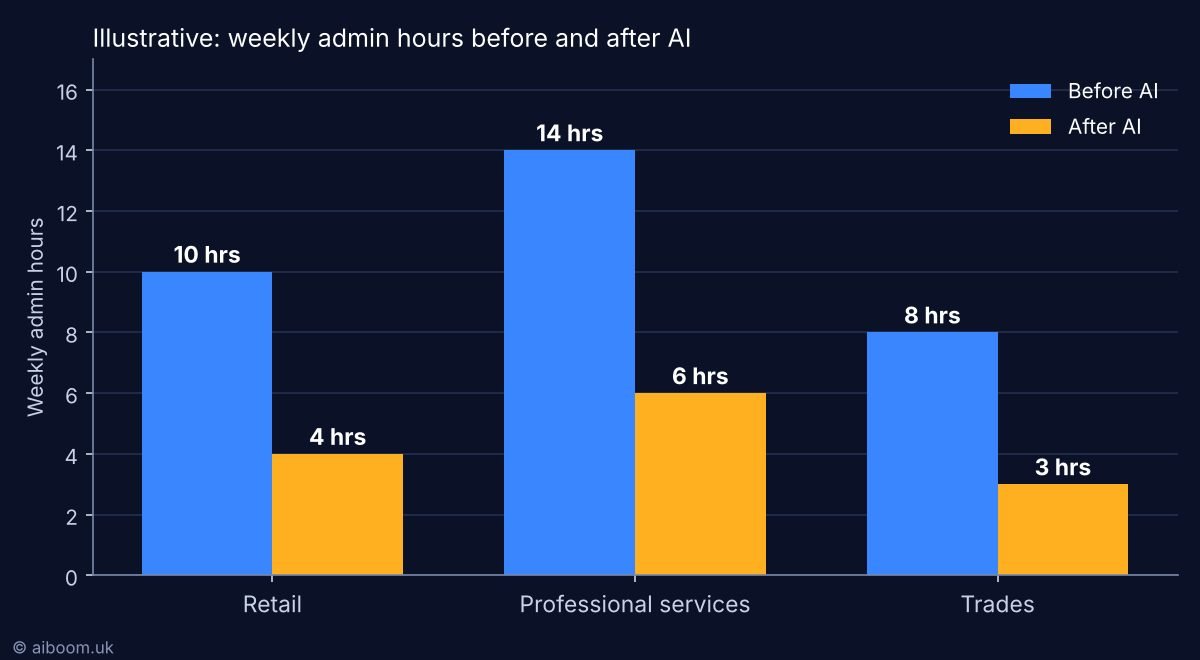
What could “good” look like?
To make this real, here is an illustrative example of how weekly admin hours could change in three common types of small business once the right task is automated. These are example figures to show the idea, not guarantees: your results will depend on your tasks, tools and team.

Step 2: Choose low-cost, single-use tools
Avoid complex enterprise software and custom AI builds. Start with off-the-shelf, free or low-cost tools that plug into the systems you already use, and give each one a single job.
| Department | Task | Example tools | Typical monthly cost* |
|---|---|---|---|
| Customer support | Answering FAQs and routing tickets | Moneypenny, Zendesk AI | Free trials to about £20/user |
| Marketing and copywriting | Drafting social posts, blogs and newsletters | ChatGPT Plus, Claude Pro | About £16 ($20) |
| Operations and admin | Transcribing meetings and summarising action items | Otter.ai, Microsoft Copilot | Free basic to about £25/user |
*Indicative prices that change often. Always check the provider’s current pricing before you commit.
The golden rule: start with one tool for one task. Five tools at once means five things to learn, five sets of terms to read and nobody sure which one saved any time.
Step 3: Map out a phased 12-week timeline
Rushing a rollout across the whole business causes friction and disruption. Roll AI out in three manageable phases instead.


- Weeks 1 to 4, the pilot. Let one or two tech-comfortable colleagues test the tool. Keep their feedback focused on how easy it is to use and where it gets stuck.
- Weeks 5 to 8, training and governance. Write a straightforward one-page internal usage policy and train the wider team to write effective prompts (the instructions you give an AI).
- Weeks 9 to 12, full integration. Roll the tool out to the wider department and watch your baseline metric closely.
A tip for the pilot: choose people who are curious, not just technical. The best pilot users are the ones who will tell you honestly when a tool is not working, and who enjoy showing colleagues what they found.
Step 4: Set governance and safety boundaries
AI saves time, but it can also create legal, data-privacy and reputational headaches if staff use it carelessly. Put three rules in place from day one.


- Protect proprietary data. Never paste sensitive client financial data, intellectual property or staff personal information into public AI tools such as the free version of ChatGPT.
- Keep a human in the loop. Every piece of text, code or analysis produced by AI must be reviewed and verified by an employee before it goes to a client or supplier.
- Check UK GDPR. Make sure any customer-facing tool complies, especially around how user data is stored and processed by third-party AI providers. The Information Commissioner’s Office (ICO) publishes guidance on AI and data protection that is worth a read.
Why the human check matters: AI tools can sound confident and still be wrong. A quick review is cheap. A wrong price, a made-up fact or a leaked client detail sent to a customer is not.
Common mistakes to avoid
- Buying before auditing. Tools without a target problem become shelfware.
- Trying to automate everything at once. Pick the one painful task first.
- No owner. Name one person responsible for the rollout and for reporting the numbers.
- Skipping the policy. A one-page policy now beats an awkward data incident later.
- Not telling staff why. Explain that the goal is to remove dull tasks, not people, and involve the team in choosing what to automate.
Frequently asked questions
How much does it cost to start using AI in a small business?
You can often start free or for around £16 to £25 per user per month, depending on the tool. Check each provider’s current pricing.
How long does it take to roll out AI in a small business?
A phased rollout over about 12 weeks is realistic: a four-week pilot, four weeks of training and policy, and four weeks of wider rollout.
Is it safe to put customer data into ChatGPT?
Not into public or free versions. Keep sensitive client, financial and staff data out of them, and check any customer-facing tool against UK GDPR.
Do I need a technical person to do this?
No. You need one organised, curious person to own the plan and measure the result.
Download the free AI Boom Small Business AI Rollout Checklist (PDF), pick your one task and one metric, and start your 12 weeks this month.
Want to understand how AI is changing business, in plain English? Read Get AI Before It Gets You, or get in touch at hello@aiboom.uk.
This article is general guidance, not legal, financial or data-protection advice. Check current tool pricing and take professional advice for your own situation. © aiboom.uk



Free download
Get the free AI Business Guides
Three plain-English guides to help your business use AI, plus a free AI policy template and workflow audit worksheet.
Get them free